
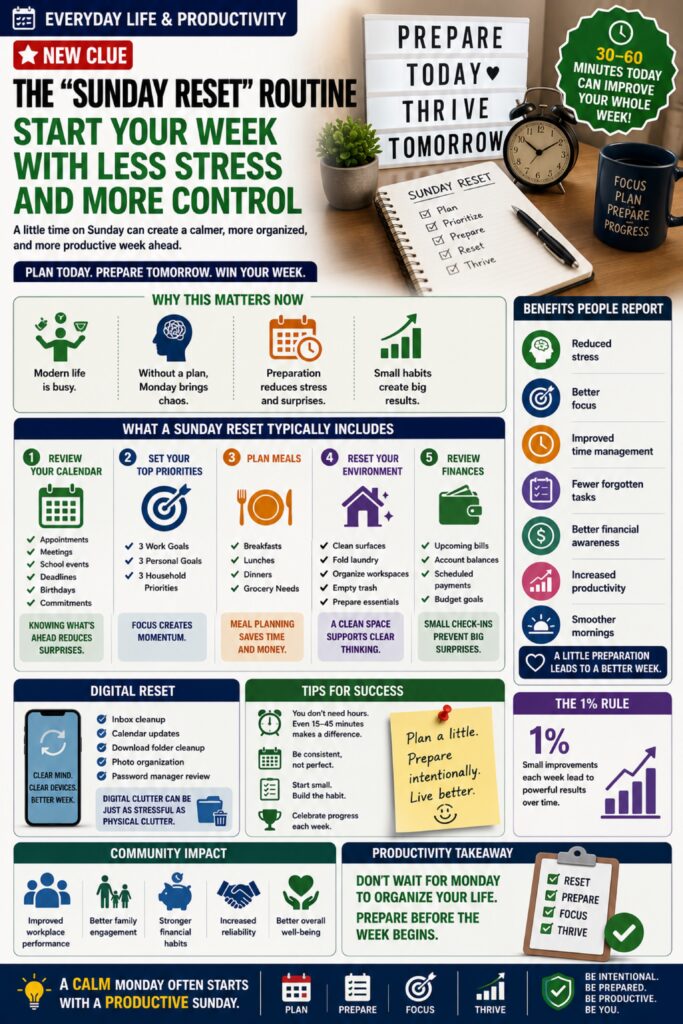
The “Sunday Reset” Routine Is Helping People Start the Week With Less Stress and More Control
Productivity experts, professional organizers, and wellness coaches are increasingly recommending a simple habit known as the Sunday Reset.
Rather than waiting until Monday morning to react to the week’s demands, the Sunday Reset involves spending 30–60 minutes preparing your home, schedule, finances, meals, and priorities before the new week begins.
The goal isn’t to work all weekend.
The goal is to eliminate Monday chaos.
Many people report that a small amount of preparation on Sunday creates a calmer, more organized, and more productive week overall.
📅 Why This Matters Now
Modern schedules are busier than ever.
People juggle:
* Work responsibilities
* School activities
* Household tasks
* Family commitments
* Appointments
* Financial obligations
* Personal goals
Without a plan, Monday often begins with:
* Last-minute decisions
* Missed deadlines
* Forgotten appointments
* Unnecessary stress
The Sunday Reset helps reduce that uncertainty.
🧠 The Hidden Cost of Starting Unprepared
When the week begins without a plan, many people experience:
* Decision fatigue
* Increased anxiety
* Missed opportunities
* Reduced productivity
* Time wasted searching for information
* Difficulty prioritizing tasks
A little preparation can prevent many small problems from becoming larger ones.
✅ What a Sunday Reset Typically Includes
📋 Review Your Calendar
Check:
* Appointments
* Meetings
* School events
* Deadlines
* Birthdays
* Commitments
Knowing what’s ahead reduces surprises.
🎯 Set Your Top Priorities
Identify:
* 3 important work goals
* 3 personal goals
* 3 household priorities
Focus creates momentum.
🍽️ Plan Meals
Decide:
* Breakfasts
* Lunches
* Dinners
* Grocery needs
Meal planning often saves both time and money.
🧺 Reset Your Environment
Spend a few minutes:
* Cleaning surfaces
* Folding laundry
* Organizing workspaces
* Emptying trash
* Preparing frequently used items
A cleaner environment often supports clearer thinking.
💰 Review Finances
Check:
* Upcoming bills
* Account balances
* Scheduled payments
* Budget goals
Small financial check-ins help prevent larger financial surprises.
📱 Digital Reset
Many people also include:
* Inbox cleanup
* Calendar updates
* Download folder cleanup
* Photo organization
* Password manager review
Digital clutter can become just as stressful as physical clutter.
🚀 Benefits People Report
Those who consistently perform weekly resets often notice:
✔ Reduced stress
✔ Better focus
✔ Improved time management
✔ Fewer forgotten tasks
✔ Better financial awareness
✔ Increased productivity
✔ Smoother mornings
⏰ You Don’t Need Hours
A successful reset doesn’t require an entire day.
Even:
* 15 minutes
* 30 minutes
* 45 minutes
Can dramatically improve the week ahead.
Consistency matters more than perfection.
🌎 Community Impact
When people are organized and less stressed, communities benefit through:
* Improved workplace performance
* Better family engagement
* Stronger financial habits
* Increased reliability
* Better overall well-being
Small habits often create large long-term results.
💡 The 1% Rule
The Sunday Reset isn’t about becoming perfectly organized.
It’s about becoming slightly more prepared each week.
Small improvements compound over time.
🎯 Productivity Takeaway
Don’t wait for Monday to organize your life.
Prepare before the week begins.
Remember:
A calm Monday often starts with a productive Sunday.
📅✅🏡📈 Reset. Prepare. Focus. Thrive.
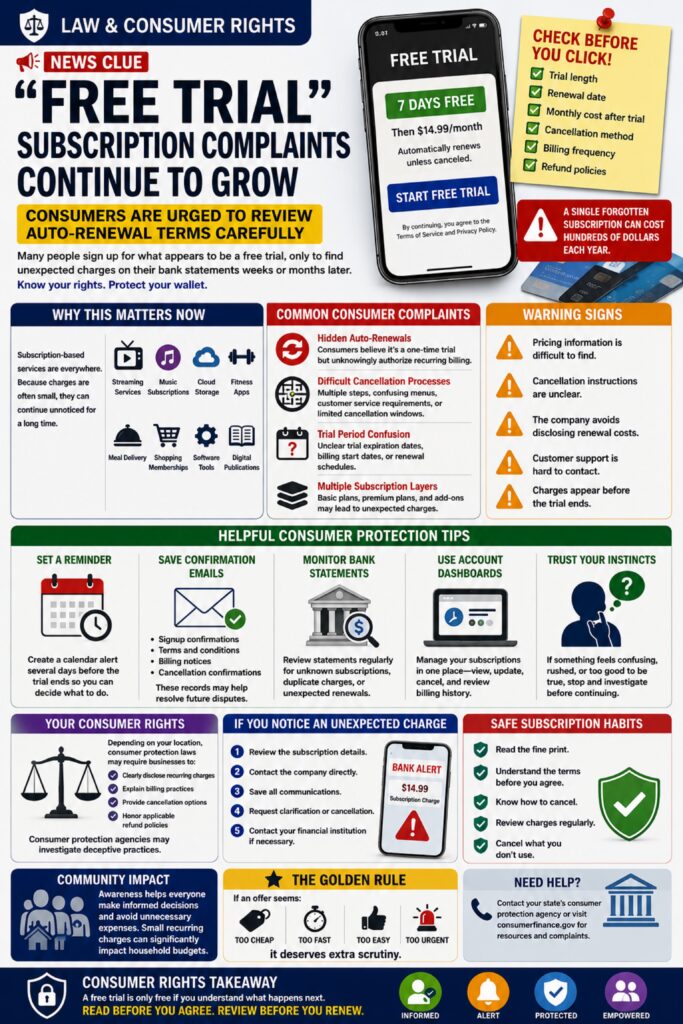
“Free Trial” Subscription Complaints Continue To Grow — Consumers Are Urged To Review Auto-Renewal Terms Carefully
Consumer protection agencies continue receiving complaints from individuals who signed up for what appeared to be a free trial, only to discover recurring charges appearing on their bank statements weeks or months later.
From streaming services and fitness apps to AI tools, meal programs, wellness subscriptions, software platforms, and online memberships, businesses increasingly use free trials as a way to introduce consumers to products and services.
While many companies operate legally and clearly disclose their terms, consumer advocates warn that some subscription offers use confusing language, difficult cancellation processes, or automatic renewals that consumers may overlook during signup.
As subscription-based services continue expanding across nearly every industry, understanding your rights as a consumer has become increasingly important.
⚖️ Why This Matters Now
Many consumers currently manage:
* Streaming services
* Music subscriptions
* Cloud storage plans
* AI platforms
* Fitness memberships
* Meal delivery services
* Shopping memberships
* Software subscriptions
* Digital publications
Because recurring charges are often relatively small, they can continue unnoticed for long periods of time.
A single forgotten subscription may cost hundreds of dollars annually.
🚨 Common Consumer Complaints
Hidden Auto-Renewals
Consumers believe they are signing up for a one-time trial but unknowingly authorize recurring billing.
Difficult Cancellation Processes
Some users report:
* Multiple cancellation steps
* Confusing account menus
* Customer service requirements
* Limited cancellation windows
Trial Period Confusion
Consumers sometimes misunderstand:
* Trial expiration dates
* Billing start dates
* Renewal schedules
Multiple Subscription Layers
Some services offer:
* Basic plans
* Premium plans
* Add-on services
Consumers may not realize multiple subscriptions have been activated.
🔍 Before Starting A Free Trial
Take a few moments to verify:
✔ Trial length
✔ Renewal date
✔ Monthly cost after trial
✔ Cancellation method
✔ Billing frequency
✔ Refund policies
Reading the details upfront can help prevent future surprises.
📅 Helpful Consumer Protection Tips
Set A Reminder
Create a calendar alert several days before the trial ends.
This allows time to evaluate whether the service remains worthwhile.
Save Confirmation Emails
Keep:
* Signup confirmations
* Terms and conditions
* Billing notices
* Cancellation confirmations
These records may help resolve future disputes.
Monitor Bank Statements
Review statements regularly for:
* Unknown subscriptions
* Duplicate charges
* Unexpected renewals
Small recurring charges are often overlooked.
Use Account Dashboards
Many services provide subscription management tools that allow users to:
* View active subscriptions
* Update payment methods
* Cancel renewals
* Review billing history
⚠️ Warning Signs
Exercise caution if:
❌ Pricing information is difficult to locate.
❌ Cancellation instructions are unclear.
❌ The company avoids disclosing renewal costs.
❌ Customer support is difficult to contact.
❌ Charges appear before the trial ends.
These situations deserve closer review.
🛡️ Your Consumer Rights
Depending on your location, consumer protection laws may require businesses to:
* Clearly disclose recurring charges
* Explain billing practices
* Provide cancellation options
* Honor applicable refund policies
Consumer protection agencies often investigate deceptive subscription practices.
📞 If You Notice An Unexpected Charge
Take action quickly:
1. Review the subscription details.
2. Contact the company directly.
3. Save all communications.
4. Request clarification or cancellation.
5. Contact your financial institution if necessary.
The sooner an issue is identified, the easier it may be to resolve.
🌎 Community Impact
Subscription services offer convenience and value for millions of consumers.
However, increased awareness helps individuals make informed financial decisions and avoid unnecessary expenses.
Small recurring charges can significantly impact household budgets over time.
🎯 Consumer Rights Takeaway
A free trial is only free if you understand what happens next.
Before clicking “Start Free Trial,” take a moment to understand the terms, set a reminder, and know how to cancel if needed.
Remember:
Read before you agree. Review before you renew.
⚖️💳🔍📅 Your attention today can prevent unwanted charges tomorrow.
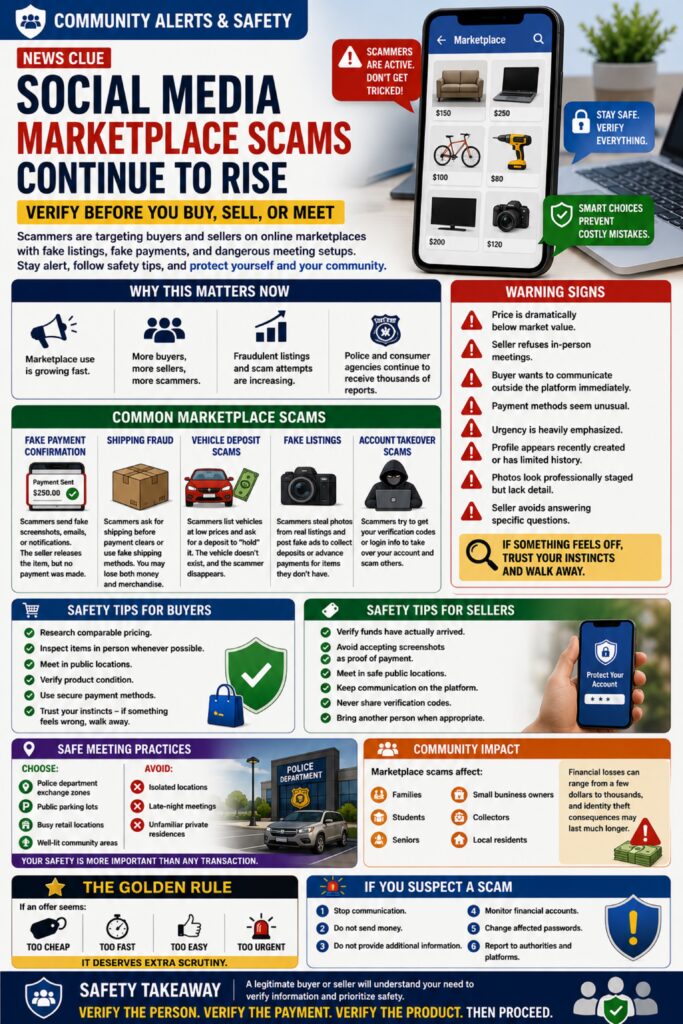
Social Media Marketplace Scams Continue To Rise — Verify Before You Buy, Sell, or Meet
Online community marketplaces have made it easier than ever to buy, sell, and trade goods locally. From furniture and electronics to vehicles, tools, collectibles, and household items, millions of transactions occur every day through social media groups and marketplace platforms.
Unfortunately, scammers are increasingly exploiting these platforms to target both buyers and sellers.
Law enforcement agencies and consumer protection organizations continue to receive reports involving fake listings, counterfeit payment confirmations, account takeover attempts, shipping fraud, deposit scams, and dangerous in-person meeting situations.
Many scams succeed because victims feel pressured to act quickly before an item is “sold” or because they trust that local marketplace users have already been verified.
🚨 Why This Matters Now
Community marketplaces are growing rapidly because they offer:
* Convenient local transactions
* Lower prices
* Quick sales
* Direct communication
* Wide product selection
Criminals follow where people gather.
As marketplace activity increases, fraudulent listings and scam attempts often increase alongside it.
⚠️ Common Marketplace Scams
💰 Fake Payment Confirmation
A buyer claims payment was sent.
They provide:
* Screenshots
* Emails
* Fake payment notifications
The seller releases the item before confirming funds were actually received.
📦 Shipping Fraud
Scammers request:
* Shipping before payment clears
* Alternative delivery methods
* Off-platform communication
Victims may lose both money and merchandise.
🚗 Vehicle Deposit Scams
Fraudsters advertise:
* Vehicles
* Boats
* RVs
* Motorcycles
At unusually attractive prices.
They request deposits to “hold” the item before the buyer has an opportunity to inspect it.
The vehicle often doesn’t exist.
🎁 Fake Listings
Scammers steal photos from legitimate listings and repost them.
Common targets include:
* Electronics
* Tools
* Appliances
* Gaming systems
* Power equipment
The goal is collecting deposits or advance payments.
🔐 Account Takeover Scams
Criminals may attempt to obtain:
* Verification codes
* Login credentials
* Authentication information
Once obtained, legitimate accounts may be used to scam additional victims.
🚩 Warning Signs
Be cautious if:
❌ The price is dramatically below market value.
❌ The seller refuses in-person meetings.
❌ The buyer wants to communicate outside the platform immediately.
❌ Payment methods seem unusual.
❌ Urgency is heavily emphasized.
❌ The profile appears recently created.
❌ Photos look professionally staged but lack detail.
❌ The seller avoids answering specific questions.
🛡️ Safety Tips For Buyers
Before purchasing:
✔ Research comparable pricing.
✔ Inspect items in person whenever possible.
✔ Meet in public locations.
✔ Verify product condition.
✔ Use secure payment methods.
✔ Trust your instincts.
If something feels wrong, walk away.
🛡️ Safety Tips For Sellers
Before releasing an item:
✔ Verify funds have actually arrived.
✔ Avoid accepting screenshots as proof of payment.
✔ Meet in safe public locations.
✔ Keep communication on the platform.
✔ Never share verification codes.
✔ Bring another person when appropriate.
🚔 Safe Meeting Practices
When meeting a buyer or seller:
Choose:
* Police department exchange zones
* Public parking lots
* Busy retail locations
* Well-lit community areas
Avoid:
* Isolated locations
* Late-night meetings
* Unfamiliar private residences
Personal safety is always more important than completing a transaction.
🌎 Community Impact
Marketplace scams affect:
* Families
* Students
* Seniors
* Small business owners
* Collectors
* Local residents
Financial losses can range from a few dollars to thousands, while identity theft consequences may persist much longer.
💡 Remember The Golden Rule
If an offer seems:
* Too cheap
* Too fast
* Too easy
* Too urgent
It deserves extra scrutiny.
Scammers often rely on excitement and urgency to bypass caution.
🎯 Safety Takeaway
A legitimate buyer or seller will understand your need to verify information and prioritize safety.
Never let pressure replace good judgment.
Remember:
Verify the person. Verify the payment. Verify the product. Then proceed.
🛒🔍🛡️⚠️ Safe transactions start with smart decisions.
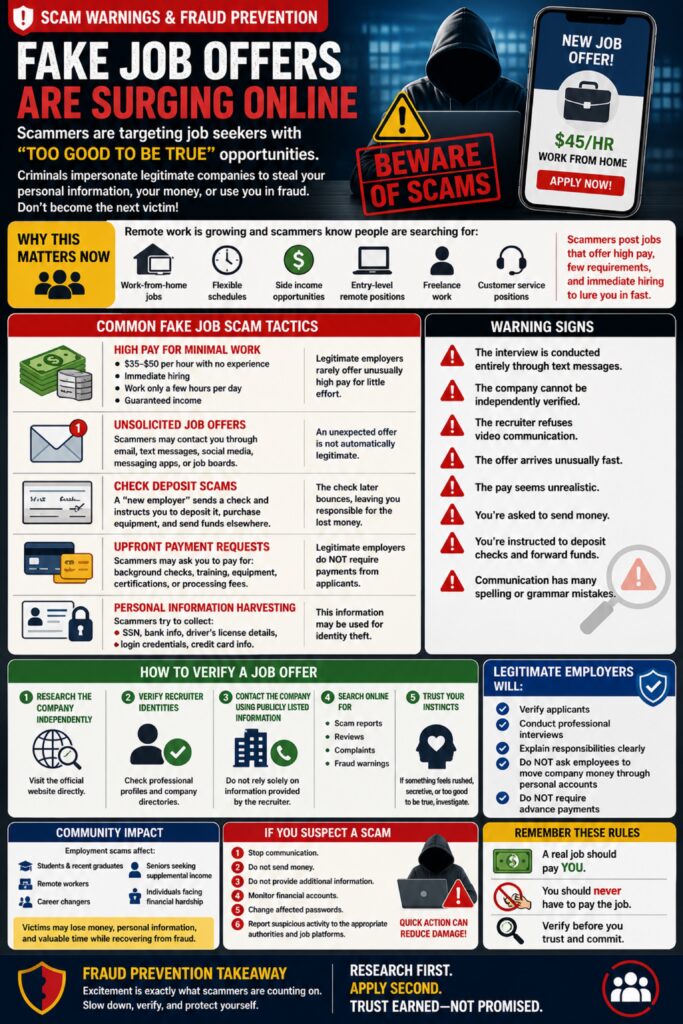
Fake Job Offers Are Surging Online — Scammers Are Targeting Job Seekers With “Too Good To Be True” Opportunities
As more employers embrace remote work, online recruiting, and digital hiring platforms, scammers are increasingly impersonating legitimate companies to trick job seekers into revealing personal information, sending money, or performing fraudulent financial transactions.
These fake job scams often appear highly professional. Criminals may create convincing websites, copy real company logos, use fake recruiter profiles, conduct online interviews, and even provide fraudulent employment paperwork.
The scam works because job seekers are often excited, hopeful, and eager to respond quickly when presented with an attractive opportunity.
Unfortunately, many victims don’t discover the deception until after sensitive information or money has already been lost.
🚨 Why This Matters Now
Remote work opportunities continue to grow.
People frequently search for:
* Work-from-home jobs
* Flexible schedules
* Side income opportunities
* Entry-level remote positions
* Freelance work
* Administrative jobs
* Customer service positions
Scammers know this.
They intentionally target individuals seeking employment by advertising positions that offer unusually high pay, minimal qualifications, or immediate hiring.
⚠️ Common Fake Job Scam Tactics
💰 High Pay for Minimal Work
Examples:
* $35–$50 per hour with no experience
* Immediate hiring
* Work only a few hours per day
* Guaranteed income
Legitimate employers rarely offer unusually high compensation for little effort.
📧 Unsolicited Job Offers
Scammers may contact victims through:
* Email
* Text messages
* Social media
* Messaging apps
* Job boards
Receiving an unexpected offer does not automatically mean it is legitimate.
🏦 Check Deposit Scams
A “new employer” sends a check and instructs the victim to:
* Deposit it
* Purchase equipment
* Send funds elsewhere
The check later bounces, leaving the victim responsible for the lost money.
💳 Upfront Payment Requests
Legitimate employers generally do not require applicants to pay for:
* Background checks
* Training
* Equipment
* Certifications
* Processing fees
Requests for payment should immediately raise concern.
🔐 Personal Information Harvesting
Scammers often attempt to collect:
* Social Security numbers
* Bank account information
* Driver’s license details
* Login credentials
* Credit card information
This information may later be used for identity theft.
🚩 Warning Signs**
Be cautious if:
❌ The interview is conducted entirely through text messages.
❌ The company cannot be independently verified.
❌ The recruiter refuses video communication.
❌ The offer arrives unusually quickly.
❌ The pay seems unrealistic.
❌ You’re asked to send money.
❌ You’re instructed to deposit checks and forward funds.
❌ Communication contains numerous spelling or grammar mistakes.
🛡️ How To Verify A Job Offer
Before accepting:
Step 1
Research the company independently.
Visit the official website directly.
Step 2
Verify recruiter identities.
Check professional profiles and company directories.
Step 3
Contact the company using publicly listed contact information.
Do not rely solely on information provided by the recruiter.
Step 4
Search online for:
* Scam reports
* Reviews
* Complaints
* Fraud warnings
Step 5
Trust your instincts.
If something feels rushed, secretive, or unusually generous, investigate further.
💡 Remember These Rules
Legitimate employers:
✔ Verify applicants
✔ Conduct professional interviews
✔ Explain responsibilities clearly
✔ Do not ask employees to move company money through personal accounts
✔ Do not require advance payments
🌎 Community Impact
Employment scams affect:
* Students
* Recent graduates
* Remote workers
* Career changers
* Seniors seeking supplemental income
* Individuals facing financial hardship
Victims may lose money, personal information, and valuable time while recovering from fraud.
🚔 If You Suspect A Scam
Immediately:
1. Stop communication.
2. Do not send money.
3. Do not provide additional information.
4. Monitor financial accounts.
5. Change affected passwords.
6. Report suspicious activity to appropriate authorities and job platforms.
Quick action can significantly reduce damage.
🎯 Fraud Prevention Takeaway
A real job should pay you.
You should never have to pay the job.
When an opportunity seems unusually easy, unusually fast, or unusually profitable, take time to verify before proceeding.
Remember:
Excitement is exactly what scammers are counting on. Slow down, verify, and protect yourself.
💼🔍🛡️⚠️ Research first. Apply second. Trust earned—not promised.
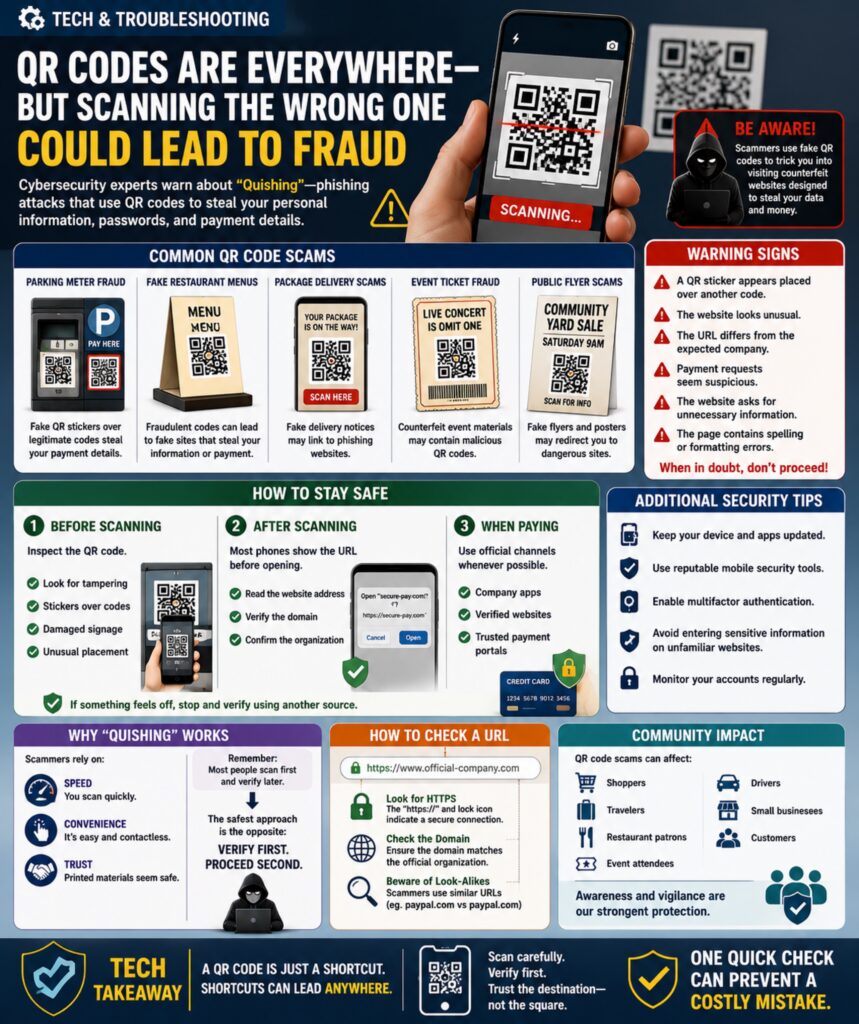
QR Codes Are Everywhere — But Scanning the Wrong One Could Lead to Fraud
QR codes have become part of everyday life. They’re used for restaurant menus, parking payments, event tickets, product information, Wi-Fi access, package tracking, digital payments, and countless other services.
While QR codes are convenient, cybersecurity experts are warning about a growing threat known as “Quishing” — phishing attacks that use QR codes instead of traditional links.
Because people cannot immediately see the website hidden inside a QR code, scammers are increasingly using fake codes to redirect victims to fraudulent websites designed to steal passwords, payment information, personal data, and account credentials.
As QR code usage continues expanding, learning how to verify them is becoming an important digital safety skill.
📱 Why This Matters Now
QR code usage exploded during recent years because they allow:
* Contactless payments
* Quick website access
* Mobile ticketing
* Digital menus
* Product authentication
* Event registration
Unfortunately, criminals quickly recognized an opportunity.
Unlike traditional phishing emails, QR code scams often bypass suspicion because people tend to trust printed materials more than unexpected links.
🚨 Common QR Code Scams
Parking Meter Fraud
Scammers place fake QR stickers over legitimate parking payment codes.
Victims believe they’re paying for parking but are actually entering payment information into a fraudulent website.
Fake Restaurant Menus
Fraudulent QR codes can direct users to websites designed to collect payment information or personal data.
Package Delivery Scams
Fake package notices sometimes include QR codes claiming to provide delivery updates.
Event Ticket Fraud
Scammers create counterfeit event materials containing malicious QR codes.
Public Flyer Scams
Fake advertisements, posters, and community notices sometimes contain fraudulent codes that redirect users to dangerous websites.
⚠️ Warning Signs
Be cautious if:
* A QR sticker appears placed over another code.
* The website looks unusual.
* The URL differs from the expected company.
* Payment requests seem suspicious.
* The website asks for unnecessary information.
* The page contains spelling or formatting errors.
Always verify before entering sensitive information.
🔍 How To Stay Safe
Before Scanning
Inspect the QR code.
Look for:
✔ Tampering
✔ Stickers placed over existing codes
✔ Damaged signage
✔ Unusual placement
After Scanning
Most phones display the destination URL before opening.
Take a moment to:
✔ Read the website address
✔ Verify the domain
✔ Confirm the organization
When Paying
Use official:
* Company apps
* Verified websites
* Trusted payment portals
Whenever possible, manually navigate to the organization’s website rather than relying solely on a QR code.
🛡️ Additional Security Tips
* Keep devices updated.
* Use reputable mobile security tools.
* Enable multifactor authentication.
* Avoid entering sensitive information on unfamiliar websites.
* Monitor accounts regularly.
These habits help protect against a wide variety of online threats.
🧠 Why Quishing Works
Scammers rely on:
* Speed
* Convenience
* Trust
Most people scan first and verify later.
Criminals hope you never verify at all.
The safest approach is the opposite:
Verify first. Proceed second.
🌎 Community Impact
QR code scams affect:
* Shoppers
* Travelers
* Restaurant patrons
* Event attendees
* Drivers
* Small business customers
As communities adopt more digital services, awareness becomes one of the strongest forms of protection.
🎯 Tech Takeaway
A QR code is simply a shortcut.
And shortcuts can lead anywhere.
Before entering payment information, passwords, or personal details, take a few seconds to confirm where that QR code is sending you.
Remember:
Scan carefully. Verify first. Trust the destination—not the square.
📱🔍🛡️⚠️ One quick check can prevent a costly mistake.
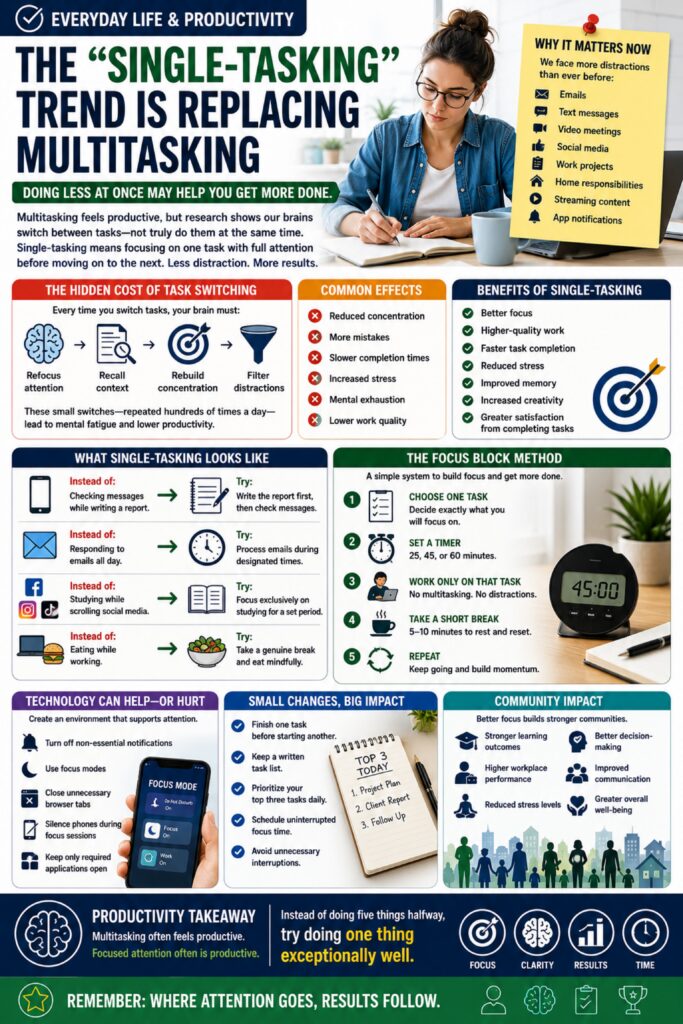
The “Single-Tasking” Trend Is Replacing Multitasking — Doing Less at Once May Help You Get More Done
For years, multitasking was often viewed as a valuable productivity skill. Many people prided themselves on answering emails during meetings, checking messages while working, watching videos while studying, or juggling multiple projects simultaneously.
Today, productivity researchers and workplace experts are increasingly promoting a different approach:
Single-Tasking.
Single-tasking means focusing on one task at a time with full attention before moving on to the next activity.
While multitasking feels productive, studies suggest that the brain doesn’t truly perform multiple complex tasks simultaneously. Instead, it rapidly switches between them. Each switch requires mental energy, reducing efficiency and increasing the likelihood of mistakes.
As distractions continue to grow through smartphones, notifications, social media, messaging platforms, and constant connectivity, many people are discovering that focusing on one thing at a time may actually help them accomplish more.
🧠 Why This Matters Now
Modern workers and students face unprecedented levels of distraction.
Many people regularly juggle:
* Emails
* Text messages
* Video meetings
* Social media
* Work projects
* Household responsibilities
* Streaming content
* App notifications
Because attention is constantly divided, many individuals report feeling busy all day while struggling to make meaningful progress.
⚠️ The Hidden Cost of Task Switching
Every time you switch tasks, your brain must:
* Refocus attention
* Recall context
* Rebuild concentration
* Filter distractions
These transitions may only take seconds, but repeated hundreds of times per day, they create significant mental fatigue.
Common effects include:
* Reduced concentration
* More mistakes
* Slower completion times
* Increased stress
* Mental exhaustion
* Lower work quality
🎯 What Single-Tasking Looks Like
Instead of:
📱 Checking messages while writing a report
Try:
📝 Writing the report first, then checking messages afterward.
Instead of:
📧 Responding to emails all day
Try:
⏰ Processing emails during designated times.
Instead of:
📚 Studying while scrolling social media
Try:
🎓 Focusing exclusively on studying for a set period.
Instead of:
🍽️ Eating while working
Try:
🥗 Taking a genuine break and eating mindfully.
🚀 Benefits of Single-Tasking
Many people report:
✔ Better focus
✔ Higher-quality work
✔ Faster task completion
✔ Reduced stress
✔ Improved memory
✔ Increased creativity
✔ Greater satisfaction from completing tasks
⏱️ The Focus Block Method
One popular approach involves:
Step 1
Choose one task.
Step 2
Set a timer for:
* 25 minutes
* 45 minutes
* 60 minutes
Step 3
Work only on that task.
Step 4
Take a short break.
Step 5
Repeat.
This structured approach helps build concentration while reducing burnout.
📱 Technology Can Help—or Hurt
Productivity experts often recommend:
* Turning off non-essential notifications
* Using focus modes
* Closing unnecessary browser tabs
* Silencing phones during focus sessions
* Keeping only required applications open
Creating an environment that supports attention often produces immediate improvements.
🧩 Small Changes That Make a Big Difference
Try:
* Finishing one task before starting another.
* Keeping a written task list.
* Prioritizing your top three tasks daily.
* Scheduling uninterrupted focus time.
* Avoiding unnecessary interruptions.
Even small reductions in task switching can improve productivity.
🌎 Community Impact
Improved focus benefits more than individual productivity.
Better concentration can contribute to:
* Stronger learning outcomes
* Higher workplace performance
* Reduced stress levels
* Better decision-making
* Improved communication
* Greater overall well-being
As distractions continue increasing, attention is becoming one of the most valuable personal resources people possess.
🔍 Productivity Takeaway
Multitasking often feels productive.
Focused attention often is productive.
Instead of doing five things halfway, try doing one thing exceptionally well.
Remember:
Where attention goes, results follow.
🎯🧠📈⏱️ One task. Full focus. Better results.
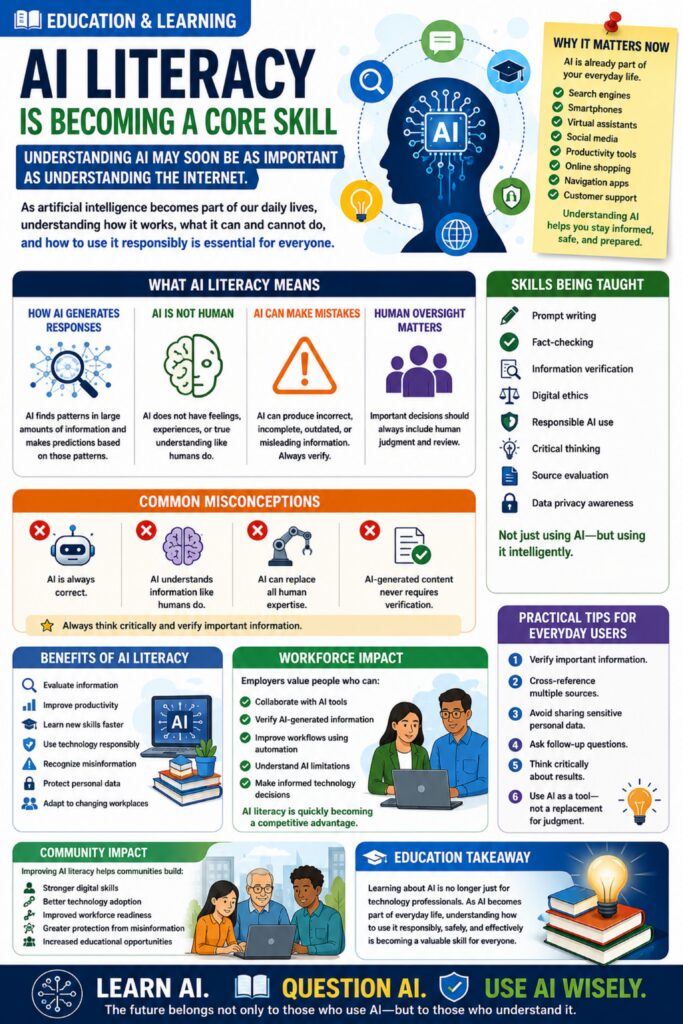
AI Literacy Is Becoming a Core Skill — Understanding AI May Soon Be as Important as Understanding the Internet
Schools, universities, employers, and workforce development organizations are increasingly emphasizing a new form of digital literacy:
AI Literacy.
As artificial intelligence becomes integrated into search engines, productivity software, customer service platforms, healthcare systems, education tools, financial services, and everyday devices, experts believe understanding how AI works is becoming an essential life skill.
AI literacy does not require learning computer programming or becoming a software engineer. Instead, it focuses on helping people understand what AI can do, what it cannot do, how to evaluate AI-generated information, and how to use these tools responsibly and effectively.
Much like internet literacy became critical during the rise of the digital age, AI literacy is quickly becoming an important part of education and lifelong learning.
🤖 Why This Matters Now
Artificial intelligence is appearing almost everywhere.
People encounter AI when using:
* Search engines
* Smartphones
* Virtual assistants
* Navigation apps
* Customer service chatbots
* Social media platforms
* Productivity software
* Content creation tools
* Translation services
* Online shopping recommendations
Many individuals use AI daily without realizing it.
As adoption continues to grow, understanding the technology becomes increasingly important.
📚 What AI Literacy Means
AI literacy includes understanding:
How AI Generates Responses
AI identifies patterns from large amounts of information and generates predictions based on those patterns.
AI Is Not Human
AI can produce impressive results, but it does not possess human judgment, emotions, experiences, or true understanding.
AI Can Make Mistakes
AI systems sometimes generate inaccurate, incomplete, outdated, or misleading information.
Verification remains essential.
Human Oversight Matters
Critical decisions should involve human review and judgment.
🧠 Skills Being Taught
Educational programs are increasingly teaching:
* Prompt writing
* Fact-checking
* Information verification
* Digital ethics
* Responsible AI use
* Critical thinking
* Source evaluation
* Data privacy awareness
The goal is not simply using AI, but using it intelligently.
⚠️ Common Misconceptions
Many people incorrectly assume:
* AI is always correct.
* AI understands information like humans do.
* AI can replace all human expertise.
* AI-generated content never requires verification.
Experts strongly recommend maintaining critical thinking when using any AI-powered system.
🎓 Benefits of AI Literacy
People who understand AI may be better equipped to:
✔ Evaluate information
✔ Improve productivity
✔ Learn new skills faster
✔ Use technology responsibly
✔ Recognize misinformation
✔ Protect personal data
✔ Adapt to changing workplaces
💼 Workforce Impact
Employers increasingly value workers who can:
* Collaborate with AI tools
* Verify AI-generated information
* Improve workflows using automation
* Understand AI limitations
* Make informed technology decisions
Many industries now view AI literacy as a competitive advantage.
📱 Practical Tips for Everyday Users
When using AI:
1. Verify important information.
2. Cross-reference multiple sources.
3. Avoid sharing sensitive personal data.
4. Ask follow-up questions.
5. Think critically about results.
6. Use AI as a tool—not as a replacement for judgment.
🌎 Community Impact
Communities that improve AI literacy may benefit from:
* Stronger digital skills
* Better technology adoption
* Improved workforce readiness
* Greater protection from misinformation
* Increased educational opportunities
The ability to understand emerging technologies helps individuals participate more effectively in modern society.
🔍 Education Takeaway
Learning about AI is no longer just for technology professionals.
As AI becomes woven into everyday life, understanding how to use it responsibly, safely, and effectively is becoming a valuable skill for everyone.
Remember:
The future belongs not only to those who use AI—but to those who understand it.
🤖📚💡🌎 Learn AI. Question AI. Use AI wisely.
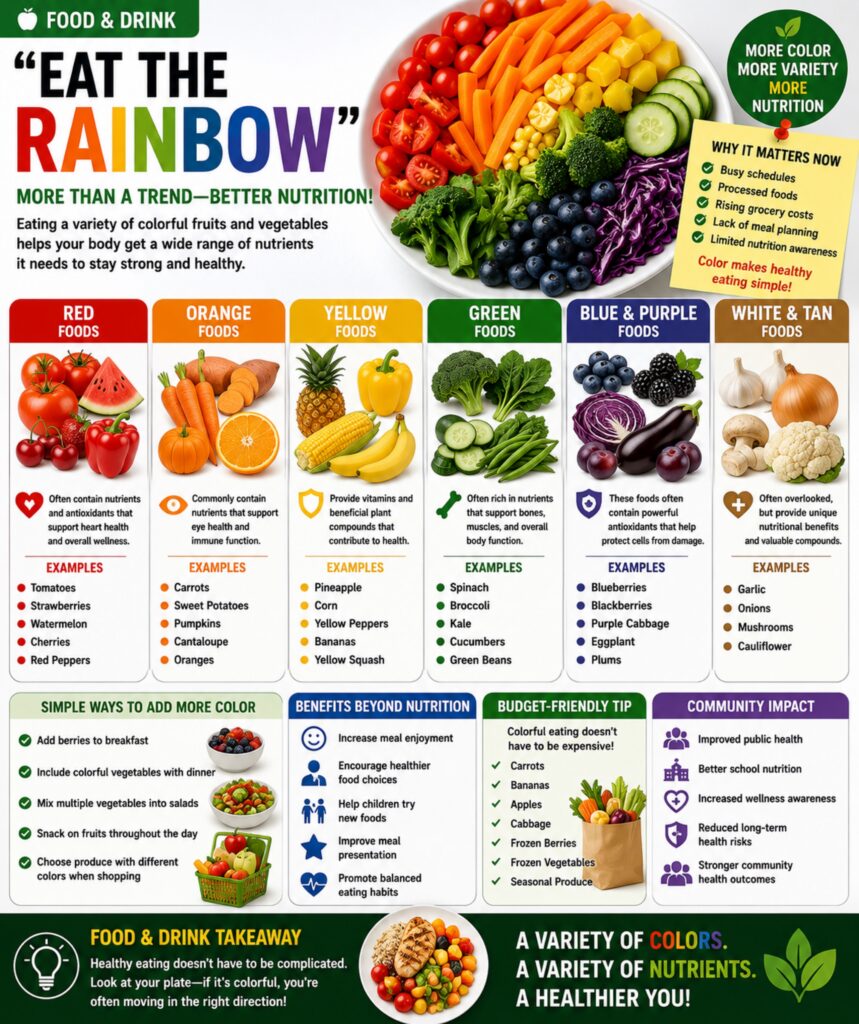
“Eat the Rainbow” Is More Than a Trend — Colorful Foods May Improve Overall Nutrition
Nutrition experts continue to encourage a simple guideline that is gaining popularity among families, schools, wellness programs, and healthcare providers:
Eat the Rainbow.
The idea is straightforward: consume fruits and vegetables of many different colors throughout the week. Different colors often indicate different vitamins, minerals, antioxidants, and plant compounds that support various functions within the body.
While no single food contains everything the body needs, a colorful plate naturally increases nutritional variety and may help people consume a broader range of beneficial nutrients.
The concept is simple enough for children to understand and practical enough for adults to apply during grocery shopping and meal planning.
🌈 Why This Matters Now
Many people struggle to meet recommended fruit and vegetable intake goals.
Common barriers include:
* Busy schedules
* Processed convenience foods
* Rising grocery costs
* Lack of meal planning
* Limited nutritional awareness
The “Eat the Rainbow” approach simplifies healthy eating by focusing on color variety instead of complicated nutrition calculations.
🔴 Red Foods
Examples:
* Tomatoes
* Strawberries
* Watermelon
* Cherries
* Red peppers
Often associated with nutrients and antioxidants that support heart health and overall wellness.
🟠 Orange Foods
Examples:
* Carrots
* Sweet potatoes
* Pumpkins
* Cantaloupe
* Oranges
Commonly contain nutrients that support eye health and immune function.
🟡 Yellow Foods
Examples:
* Pineapple
* Corn
* Yellow peppers
* Bananas
* Yellow squash
Often provide vitamins and beneficial plant compounds that contribute to overall health.
🟢 Green Foods
Examples:
* Spinach
* Broccoli
* Kale
* Cucumbers
* Green beans
Often rich in nutrients that support bones, muscles, and overall body function.
🔵🟣 Blue & Purple Foods
Examples:
* Blueberries
* Blackberries
* Purple cabbage
* Eggplant
* Plums
These foods often contain powerful antioxidants that help protect cells from damage.
⚪ White & Tan Foods
Examples:
* Garlic
* Onions
* Mushrooms
* Cauliflower
Though often overlooked, these foods provide unique nutritional benefits and valuable compounds.
🍽️ Simple Ways To Add More Color
Try:
* Adding berries to breakfast
* Including colorful vegetables with dinner
* Mixing multiple vegetables into salads
* Snacking on fruits throughout the day
* Choosing produce with different colors during grocery shopping
Small additions can significantly improve dietary variety over time.
🧠 Benefits Beyond Nutrition
Colorful meals may also:
✔ Increase meal enjoyment
✔ Encourage healthier food choices
✔ Help children try new foods
✔ Improve meal presentation
✔ Promote balanced eating habits
Many people naturally consume more fruits and vegetables when focusing on color diversity.
🛒 Budget-Friendly Tip
You don’t need exotic ingredients.
Affordable options often include:
* Carrots
* Bananas
* Apples
* Cabbage
* Frozen berries
* Frozen vegetables
* Seasonal produce
Nutritional variety can be achieved without significantly increasing grocery costs.
🌎 Community Impact
Healthy eating habits contribute to:
* Improved public health
* Better school nutrition
* Increased wellness awareness
* Reduced long-term health risks
* Stronger community health outcomes
Simple nutrition education can create lasting positive effects across generations.
🔍 Food & Drink Takeaway
Healthy eating doesn’t have to be complicated.
Sometimes the easiest nutrition guide is also the most visual:
Look at your plate.
If it contains a variety of colors, you’re often moving in the right direction.
🌈🥦🍓🥕🍇 More color. More variety. More nutrition.
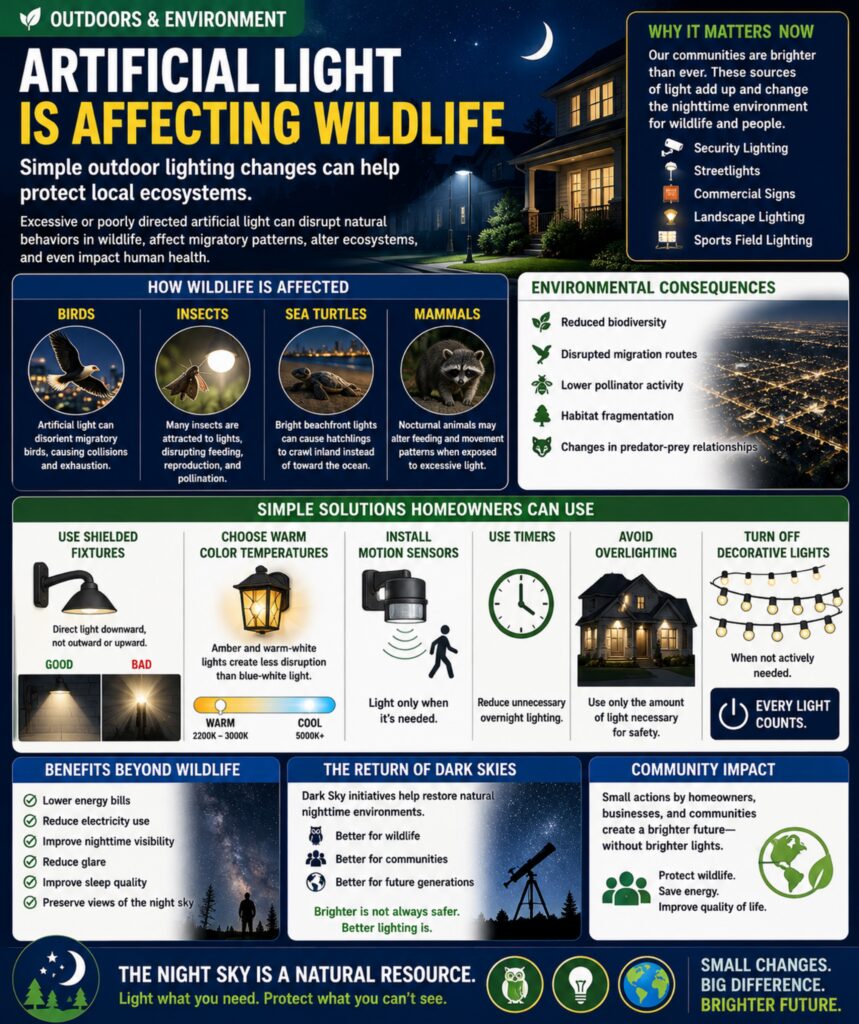
Artificial Light Is Affecting Wildlife — Simple Outdoor Lighting Changes Can Help Protect Local Ecosystems
As communities continue to grow, scientists and environmental organizations are paying closer attention to a lesser-known environmental issue: light pollution.
While outdoor lighting improves safety, visibility, and security, excessive or poorly directed artificial light can disrupt natural behaviors in wildlife, affect migratory patterns, alter ecosystems, and even impact human sleep cycles.
From bright residential floodlights to commercial signage and urban skyglow, artificial light is increasingly changing nighttime environments that many species have depended on for thousands of years.
The good news is that small adjustments to outdoor lighting can significantly reduce environmental impacts while still maintaining safety and visibility.
🌙 Why This Matters Now
Modern communities are brighter than ever.
Sources of nighttime illumination include:
* Security lighting
* Streetlights
* Parking lot lighting
* Decorative landscape lighting
* Commercial signage
* Digital billboards
* Sports field lighting
As development expands, truly dark nighttime environments are becoming increasingly rare.
Researchers are now studying how these changes affect both wildlife and human health.
🦉 How Wildlife Is Affected
Many species rely on darkness to:
* Hunt
* Navigate
* Reproduce
* Migrate
* Avoid predators
Artificial light can interfere with these natural behaviors.
Examples include:
Birds
Migratory birds often use natural nighttime cues for navigation.
Bright city lights can disorient them, causing collisions with buildings and exhaustion during migration.
Insects
Many insects are naturally attracted to light sources.
This can disrupt feeding patterns, reproduction, and pollination activities.
Sea Turtles
Young sea turtles use moonlight and natural horizons to locate the ocean.
Artificial beachfront lighting can cause hatchlings to move in the wrong direction.
Mammals
Nocturnal animals often alter feeding and movement patterns when exposed to excessive nighttime lighting.
🌎 Environmental Consequences
Light pollution may contribute to:
* Reduced biodiversity
* Disrupted migration routes
* Lower pollinator activity
* Habitat fragmentation
* Changes in predator-prey relationships
Because ecosystems are interconnected, even small disruptions can create larger environmental effects over time.
💡 Simple Solutions Homeowners Can Use
Environmental experts recommend:
Use Shielded Fixtures
Direct light downward rather than outward or upward.
Choose Warm Color Temperatures
Amber and warm-white lights generally create less disruption than bright blue-white lighting.
Install Motion Sensors
Only illuminate areas when needed.
Use Timers
Reduce unnecessary overnight lighting.
Avoid Overlighting
Use only the amount of light necessary for safety.
Turn Off Decorative Lighting
When not actively needed.
🏡 Benefits Beyond Wildlife
Reducing unnecessary lighting can also:
✔ Lower energy bills
✔ Reduce electricity consumption
✔ Improve nighttime visibility
✔ Reduce glare
✔ Improve sleep quality
✔ Preserve views of the night sky
🌌 The Return of Dark Skies
Communities worldwide are participating in “Dark Sky” initiatives designed to reduce light pollution and restore natural nighttime environments.
Residents often discover that properly designed lighting actually improves visibility by reducing glare and creating more balanced illumination.
Many people are surprised to learn that brighter does not always mean safer.
🌱 Community Impact
Small actions taken by individual homeowners, businesses, and municipalities can collectively create meaningful environmental improvements.
By making thoughtful lighting choices, communities can:
* Protect wildlife
* Save energy
* Improve quality of life
* Preserve natural ecosystems
* Maintain safer outdoor environments
🔍 Outdoors & Environment Takeaway
Darkness is an important part of nature.
Protecting nighttime environments doesn’t require turning off every light—it simply means using light more wisely.
Remember:
The night sky is a natural resource. Small lighting changes can make a big difference for wildlife, communities, and future generations.
🌙🦉💡🌎 Light what you need. Protect what you can’t see.
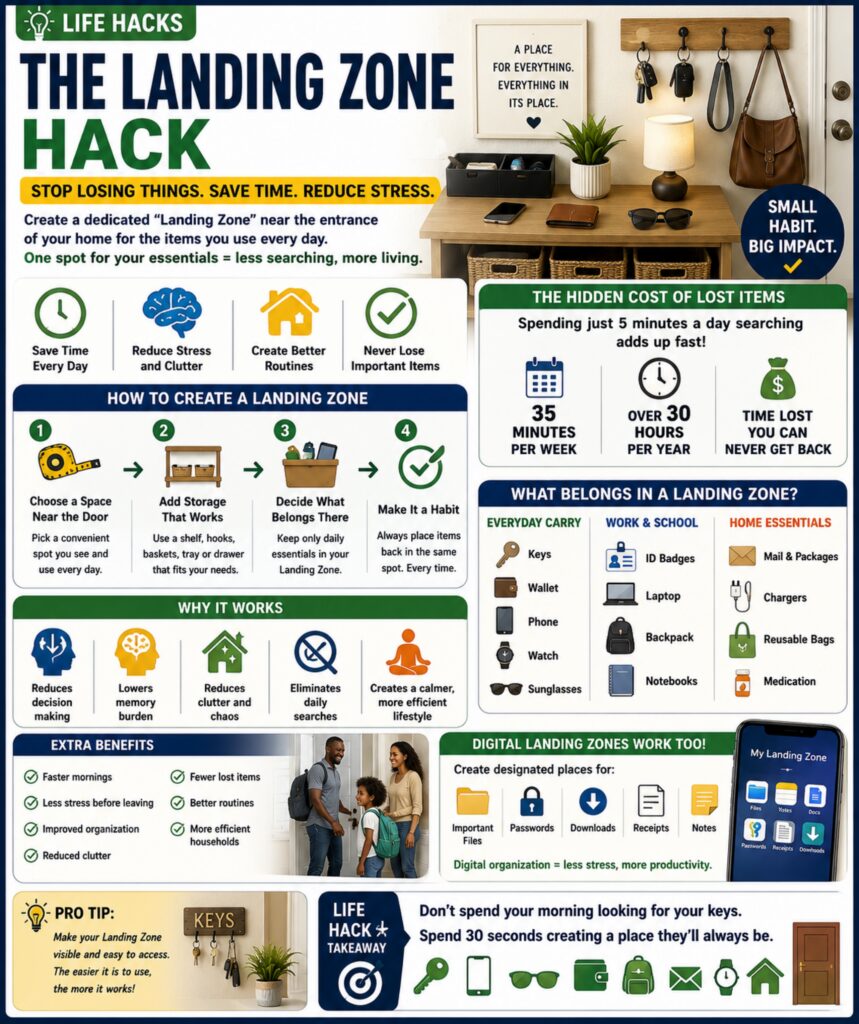
The “Landing Zone” Hack Is Helping People Stop Losing Everyday Items
One of the simplest organization hacks gaining popularity is creating a dedicated Landing Zone near the entrance of your home.
A Landing Zone is a small, designated area where you immediately place the items you use most often when leaving or returning home.
For many people, the daily search for keys, wallets, phones, sunglasses, work badges, purses, chargers, and mail creates unnecessary stress and wasted time. Studies on habits and organization suggest that reducing decision-making and creating consistent routines can dramatically improve efficiency.
Instead of setting important items down in random places throughout the day, the Landing Zone creates a single predictable location where essential belongings always belong.
🔑 Why This Matters Now
Modern life requires people to keep track of more items than ever before.
Many individuals carry:
* Smartphones
* Smartwatches
* Vehicle keys
* House keys
* Wallets
* Work IDs
* Earbuds
* Charging cables
* Sunglasses
* Medication
* Packages and mail
When these items are placed in different locations daily, small searches add up to significant wasted time and frustration.
⏰ The Hidden Cost of Lost Items
Many people spend several minutes each day looking for:
* Keys
* Phones
* Wallets
* Remote controls
* Chargers
* Important documents
Five minutes of searching each day equals:
* 35 minutes per week
* Over 30 hours per year
That’s nearly an entire work week spent looking for misplaced items.
🏠 How To Create a Landing Zone
A Landing Zone can be:
* Small shelf
* Entryway table
* Wall organizer
* Hooks near the door
* Basket system
* Charging station
* Cabinet drawer
The size doesn’t matter.
Consistency does.
📦 What Belongs in a Landing Zone
Common items include:
Everyday Carry
* Keys
* Wallet
* Phone
* Watch
* Sunglasses
Work & School
* ID badges
* Laptops
* Backpacks
* Notebooks
Home Essentials
* Incoming mail
* Packages
* Reusable shopping bags
* Chargers
The goal is creating one trusted location for frequently used items.
🧠 Why It Works
The Landing Zone works because it reduces:
* Decision making
* Memory burden
* Clutter
* Daily searches
* Stress
Instead of remembering where an item is, you only need to remember one rule:
Put it in the Landing Zone.
🚀 Additional Benefits
People often report:
✔ Faster mornings
✔ Less stress before leaving
✔ Improved organization
✔ Reduced clutter
✔ Fewer lost items
✔ Better routines
✔ More efficient households
📱 Digital Landing Zones
The same concept works digitally.
Create designated locations for:
* Important files
* Password managers
* Downloads
* Receipts
* Notes
Digital organization follows many of the same principles as physical organization.
💡 Pro Tip
Make your Landing Zone visible.
If it’s hidden inside a closet or drawer you rarely open, you’re less likely to use it consistently.
The easier it is to access, the more effective it becomes.
🎯 Life Hack Takeaway
Organization doesn’t require complicated systems.
Sometimes the best solution is simply giving important things a permanent home.
Remember:
Don’t spend your morning looking for your keys. Spend 30 seconds creating a place they’ll always be.
🔑📱🕶️🏠 A place for everything. Everything in its place.
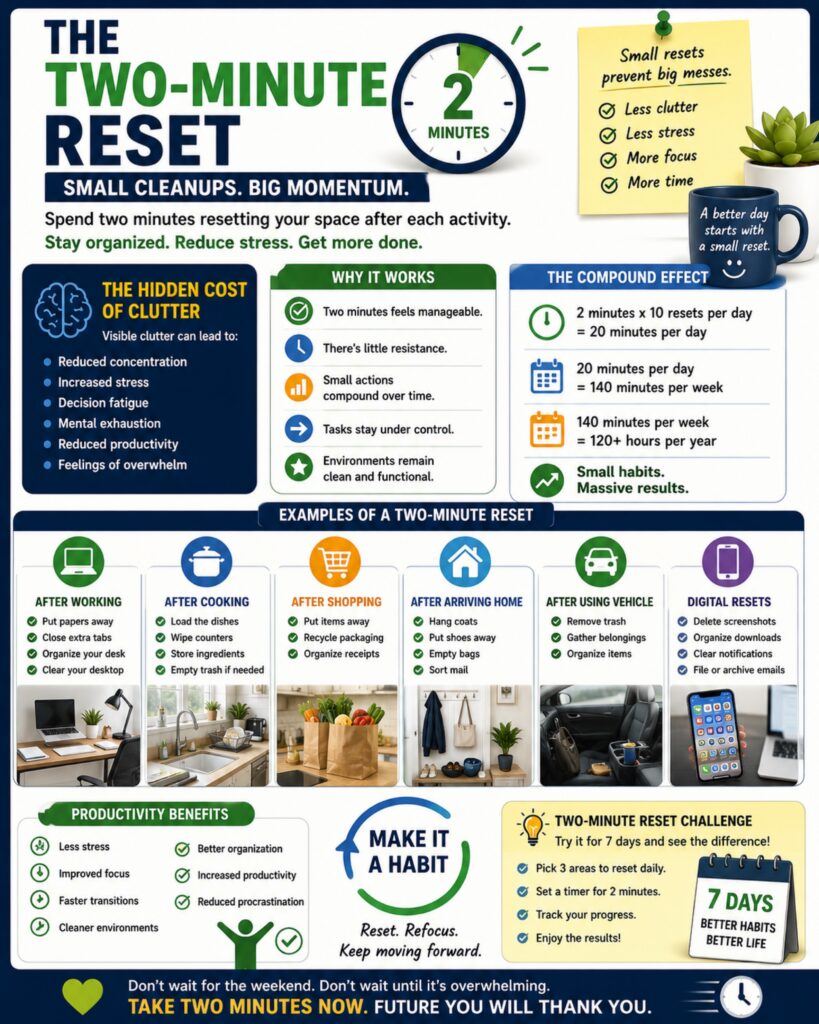
The “Two-Minute Reset” Is Becoming a Popular Productivity Habit — Small Cleanups Create Big Momentu
Productivity experts, organizers, and workplace coaches are increasingly recommending a simple habit known as the Two-Minute Reset.
The concept is straightforward:
Whenever you finish an activity, spend two minutes restoring the space before moving on to the next task.
Instead of allowing clutter, unfinished items, and distractions to accumulate throughout the day, small resets keep environments organized and reduce mental overload.
Many people underestimate how much visual clutter affects focus, stress levels, and productivity.
A desk covered with paperwork, a kitchen filled with dishes, an overflowing inbox, or a vehicle full of miscellaneous items can create a constant background reminder of unfinished work.
The Two-Minute Reset prevents these small problems from becoming large ones.
⏰ Why This Matters Now
Modern life is busier than ever.
People often move rapidly between:
* Work tasks
* Meetings
* Emails
* Household chores
* Social activities
* Parenting responsibilities
* Personal projects
Because we’re constantly switching activities, small messes and unfinished tasks tend to accumulate faster than we realize.
By the end of the day, many people feel overwhelmed—not because of one major problem—but because of dozens of small unfinished ones.
🧠 The Hidden Mental Cost of Clutter
Researchers have found that visible clutter can contribute to:
* Reduced concentration
* Increased stress
* Decision fatigue
* Mental exhaustion
* Reduced productivity
* Feelings of overwhelm
Even when you’re not actively thinking about the clutter, your brain is still processing it.
A cleaner environment often supports clearer thinking.
🏠 Examples of a Two-Minute Reset
After Working
* Put papers away
* Close unnecessary tabs
* Organize your workspace
* Clear your desktop
After Cooking
* Load dishes
* Wipe counters
* Store ingredients
* Empty trash if needed
After Shopping
* Put items away immediately
* Recycle packaging
* Organize receipts
After Arriving Home
* Hang coats
* Put shoes away
* Empty bags
* Sort mail
After Using Your Vehicle
* Remove trash
* Gather belongings
* Organize items before leaving
📱 Digital Resets Matter Too
The same principle applies digitally.
Spend two minutes:
* Deleting unnecessary screenshots
* Organizing downloads
* Clearing notifications
* Filing documents
* Archiving emails
Digital clutter can become just as overwhelming as physical clutter.
🚀 Why It Works
The habit succeeds because:
* Two minutes feels manageable.
* There’s little resistance.
* Small actions compound over time.
* Tasks stay under control.
* Environments remain functional.
The goal isn’t perfection.
The goal is preventing small problems from becoming large ones.
💡 Productivity Benefits
People who consistently perform small resets often report:
✔ Less stress
✔ Improved focus
✔ Faster task transitions
✔ Cleaner environments
✔ Better organization
✔ Increased productivity
✔ Reduced procrastination
🔄 The Compound Effect
Two minutes may not sound significant.
But:
* 2 minutes × 10 resets per day = 20 minutes
* 20 minutes per day = 140 minutes per week
* 140 minutes per week = over 120 hours annually
Small habits create powerful long-term results.
🎯 Productivity Takeaway
Don’t wait for a massive cleaning session.
Don’t wait for the weekend.
Don’t wait until things become overwhelming.
Take two minutes now.
Future you will thank you.
Remember:
Small resets create big momentum. A cleaner space often leads to a clearer mind. ⏰🧹💡📈
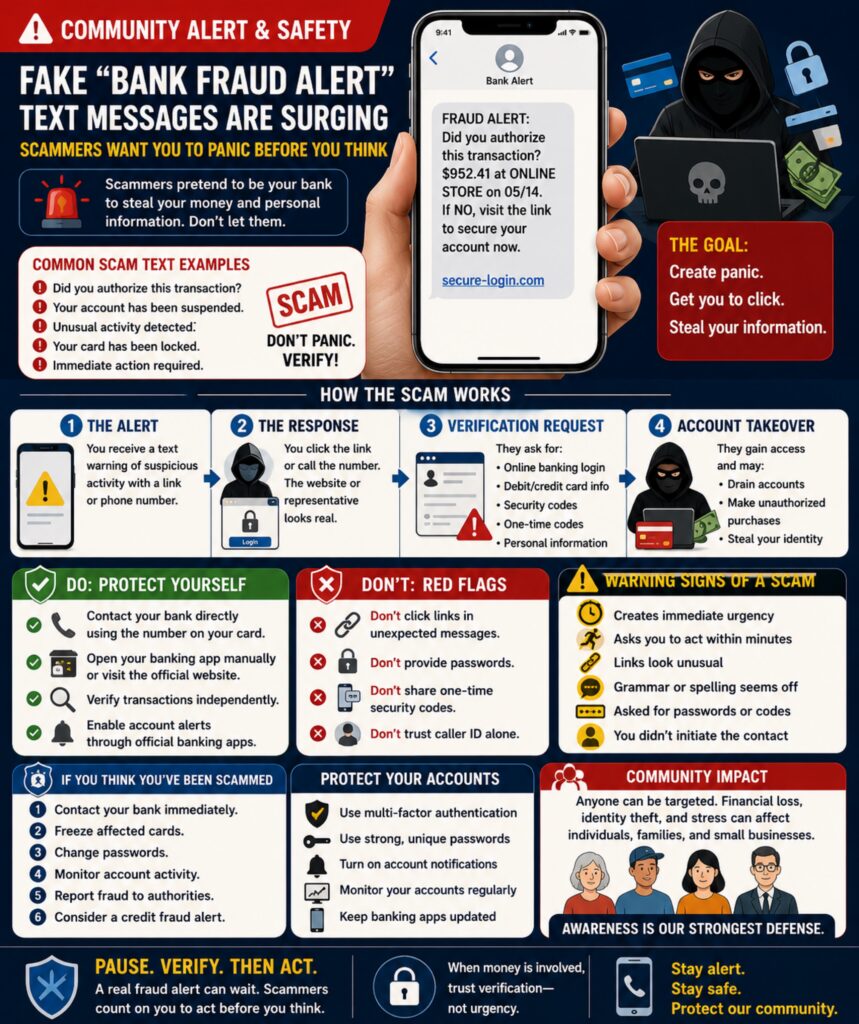
Fake “Bank Fraud Alert” Text Messages Are Surging — Scammers Want You to Panic Before You Think
Communities nationwide are seeing a sharp increase in fraud alert impersonation scams, where criminals send text messages claiming to be from a bank, credit union, payment app, or credit card company.
The messages often appear urgent and alarming:
* “Did you authorize this transaction?”
* “Your account has been suspended.”
* “Unusual activity detected.”
* “Your card has been locked.”
* “Immediate action required.”
The goal is simple: create panic.
Scammers know that when people believe their money is at risk, they are more likely to react quickly without carefully verifying the message.
🚨 Why This Matters Now
Financial institutions are increasingly using legitimate fraud alerts to protect customers.
Unfortunately, criminals are exploiting that familiarity.
Modern scam texts often:
* Look professionally designed
* Use bank-like language
* Mimic legitimate fraud departments
* Include realistic links
* Use spoofed phone numbers
Some even arrive within existing message threads, making them appear more trustworthy.
⚠️ How the Scam Typically Works
Step 1 — The Alert
The victim receives a text warning of suspicious activity.
A link or phone number is provided.
Step 2 — The Response
The victim clicks the link or calls the number.
The website or representative appears legitimate.
Step 3 — Verification Request
The scammer requests:
* Online banking credentials
* Debit card information
* Security codes
* One-time authentication codes
* Personal information
Many victims believe they are speaking with legitimate bank representatives.
Step 4 — Account Takeover
Once access is obtained:
* Accounts may be drained
* Cards may be compromised
* Personal information may be stolen
* New fraud may be committed using the victim’s identity
🛡️ Critical Safety Guidance
If you receive a fraud alert:
DO:
✔ Contact your bank directly using the number on your card.
✔ Open your banking app manually.
✔ Log in through official channels.
✔ Verify transactions independently.
✔ Enable account alerts through official banking apps.
DON’T:
❌ Click links in unexpected messages.
❌ Provide passwords.
❌ Provide one-time security codes.
❌ Share authentication texts.
❌ Trust caller ID alone.
📱 Warning Signs of a Scam
Be suspicious if:
* The message creates immediate urgency.
* It asks you to act within minutes.
* Links look unusual.
* Grammar seems odd.
* You are asked for passwords.
* You are asked for verification codes.
Legitimate banks generally do not request sensitive authentication information through unsolicited texts.
🏘️ Community Impact
These scams affect:
* Seniors
* Young adults
* Small business owners
* Online shoppers
* Mobile banking users
Financial losses can range from a few dollars to entire account balances.
Beyond monetary losses, victims often spend months restoring accounts, replacing cards, updating passwords, and repairing identity theft damage.
🔒 How To Protect Yourself
Experts recommend:
* Multi-factor authentication
* Strong unique passwords
* Account activity notifications
* Banking app security features
* Regular account monitoring
Awareness remains one of the most effective defenses.
🚔 What To Do If You Fall Victim
If you believe you’ve interacted with a scam:
1. Contact your bank immediately.
2. Freeze affected cards.
3. Change passwords.
4. Monitor account activity.
5. Report fraud to relevant authorities.
6. Enable fraud alerts on credit files if necessary.
The faster you respond, the greater the chance of limiting financial damage.
🔍 Safety Takeaway
Scammers want you to react emotionally.
Protect yourself by slowing down.
Pause. Verify. Then act.
A real fraud alert can wait long enough for you to confirm it through official channels.
📱🛡️💳 When money is involved, trust verification—not urgency.
Beat the Heat: Surviving a Heat Wave
We all love summer, but when a heat wave strikes, the weather goes from “beach day” to dangerous incredibly fast. Extreme heat is actually one of the leading weather-related killers, yet many of us don’t take it seriously enough until we are already feeling sick.
Let’s get a clue on how to spot the red flags of heat illness, and exactly what to do (and what not to do) when the mercury rises.
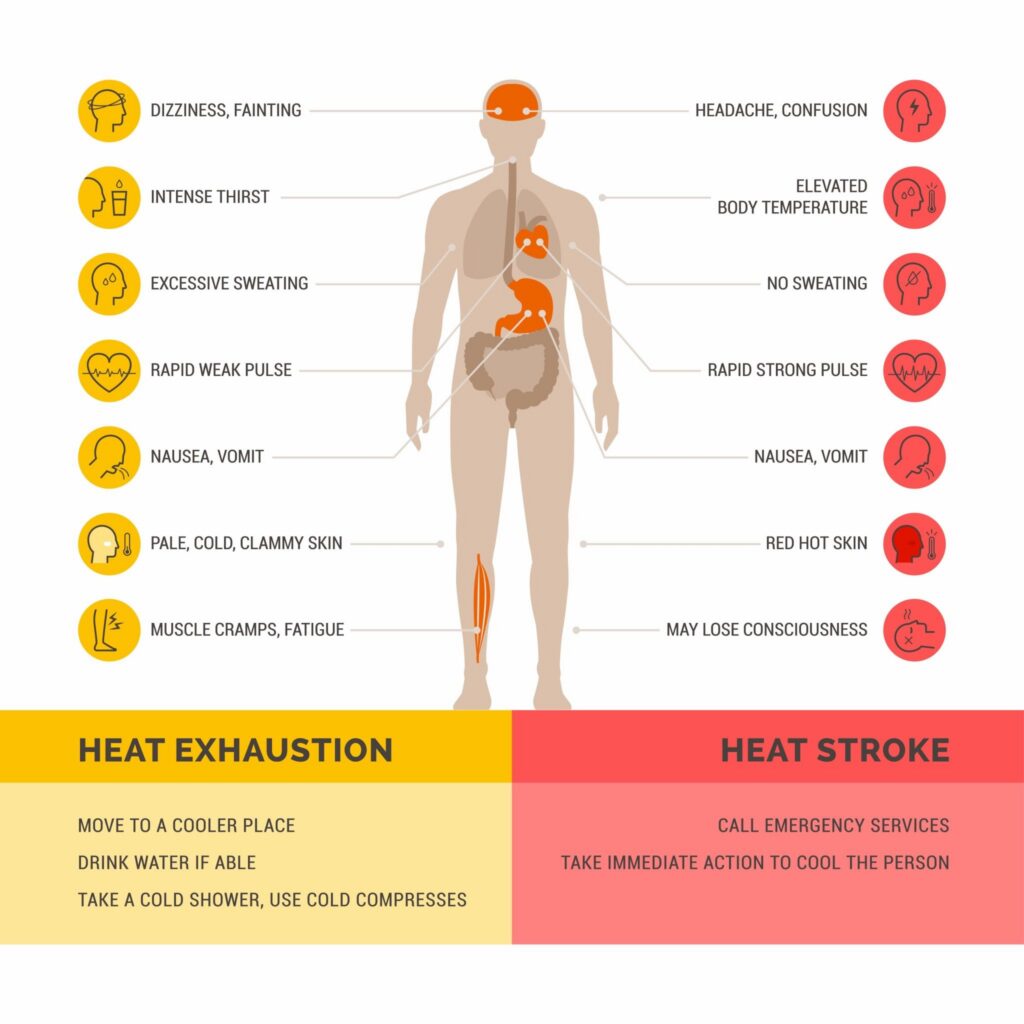
The Big Red Flags: Heat Exhaustion vs. Heat Stroke
Your body cools itself by sweating, but when it’s too hot or humid, that built-in air conditioner can fail. This leads to two main stages of heat illness: Heat Exhaustion (the warning phase) and Heat Stroke (a true medical emergency).
Understanding the visual differences between these two states can quite literally save a life.
Heat Exhaustion: The person is sweating heavily, has pale, cold, clammy skin, and might feel faint or nauseous. Their body is struggling, but still trying to fight the heat.
Heat Stroke: This happens when the body’s internal temperature spikes past 103°F (39.4°C). The skin becomes red, hot, and completely dry (sweat stops). Most importantly, they will experience confusion, dizziness, or even loss of consciousness. If you see these signs, call 911 immediately.
The “Do’s” and “Don’ts” of Heat Wave Safety
When the thermometer pushes into triple digits, how you react matters. Here is your quick checklist of what to prioritize and what to avoid entirely.
What to DO:
Drink before you are thirsty: By the time you feel thirsty, you are already slightly dehydrated. Sip water or electrolyte-rich drinks consistently throughout the day.
Find AC or public cooling centers: If your home doesn’t have air conditioning, spend the hottest parts of the day at a library, mall, or community cooling center. Just a few hours in AC can drastically reduce your body’s heat stress.
Check on high-risk neighbors: Check in twice a day on elderly neighbors, friends with chronic illnesses, or those who live alone to ensure they are keeping cool.
Dress like you’re in the tropics: Wear loose, lightweight, light-colored clothing. Dark colors absorb heat, and tight clothes trap it against your skin.
What NOT to Do:
Don’t rely solely on electric fans in extreme heat: When temperatures climb above 95°F (35°C), blowing hot air across your skin actually heats you up faster rather than cooling you down. Use wet towels or cool showers instead.
Don’t leave anyone in a parked car: Not even for “just a minute,” and not even with the windows cracked. A car’s interior can heat up by 20 degrees in just 10 minutes, making it a death trap for children and pets.
Don’t drink alcohol or heavy caffeine: Both of these are diuretics (substances that make you pass fluids faster), which accelerate dehydration. Stick to water or sports drinks.
Don’t exercise at noon: Save your outdoor workouts, heavy yard work, or long walks for early dawn or late dusk when the sun’s rays are least direct.
Stay safe, keep hydrated, and help your community stay cool this summer!

Protecting Our Pets: The Hidden Dangers of Summer Heat Waves
Our pets love a good sunny day just as much as we do, but when a summer heat wave hits, the outdoor world becomes dangerous for them incredibly fast. Because dogs and cats don’t sweat through their skin the way humans do, they have a much harder time regulating their body temperature. Dogs rely almost entirely on panting to release heat, which becomes highly inefficient when the air around them is thick, hot, and humid. Because our furry companions can’t tell us when they are pushing past their limits, it is up to us to get a clue, recognize the subtle warning signs of heat stress, and adjust our routines to keep them safe.
Catching the early red flags of a heat-related illness can quite literally be a lifesaver. You should monitor your pet closely during high temperatures for frantic, heavy panting that sounds harsh or loud, along with excessive drooling of thick, ropey saliva. Another clear warning sign is the color of their gums; lifting your dog’s lip should reveal a healthy pink, so if you see bright red, dark purple, or completely pale, dry gums, their circulatory system is in serious trouble. If the heat stress progresses, pets will become lethargic, stumble, appear disoriented, or even begin vomiting, which are major indicators of heat stroke that require immediate veterinary attention.
If you ever need to cool down an overheating pet, the method you use matters just as much as how fast you act. You should apply cool or lukewarm water to their belly, armpits, and paw pads, or wrap them in damp towels while running a fan nearby. It is a common instinct to reach for ice or submerge an overheated dog in an ice-filled bath, but this is actually highly dangerous. Ice-cold water causes the blood vessels near the surface of the skin to constrict sharply, which effectively traps the intense heat inside their vital organs and makes the internal heat stroke even worse. Stick to cool water and call your vet immediately while you work on lowering their temperature.
Beyond the air temperature, summer brings a massive hidden hazard right to the ground we walk on. Asphalt and concrete absorb and retain an incredible amount of solar energy, meaning that on a sunny 85°F day, the pavement can easily skyrocket to a scorching 130°F. This is hot enough to severely burn and blister a dog’s sensitive paw pads in just a few minutes of walking. Before heading outside, always perform the seven-second test by pressing the back of your bare hand firmly against the pavement. If you cannot comfortably keep it there for a full seven seconds, it is far too hot for your pet, and you should shift your walks to the grass or wait until the early morning or late evening when the ground has cooled.
Keeping pets safe during a heat wave also means avoiding a few common summer mistakes that well-meaning owners often make. First, you should never shave a double-coated dog breed, such as a Husky, Shepherd, or Golden Retriever, because their dense undercoat actually acts as a natural insulation system that keeps them cool in the summer and protects their skin from severe sunburn. Second, if you leave the house for errands, always leave the air conditioning running at a safe temperature for the pets staying behind, and absolutely never leave a pet inside a parked car. Even with the windows cracked on a mild day, a vehicle’s interior acts like a greenhouse, soaring past 100°F in a mere ten minutes and creating a fatal trap before you even realize it.
Why Your Phone Storage Keeps Filling Up — Hidden Files May Be the Real Problem
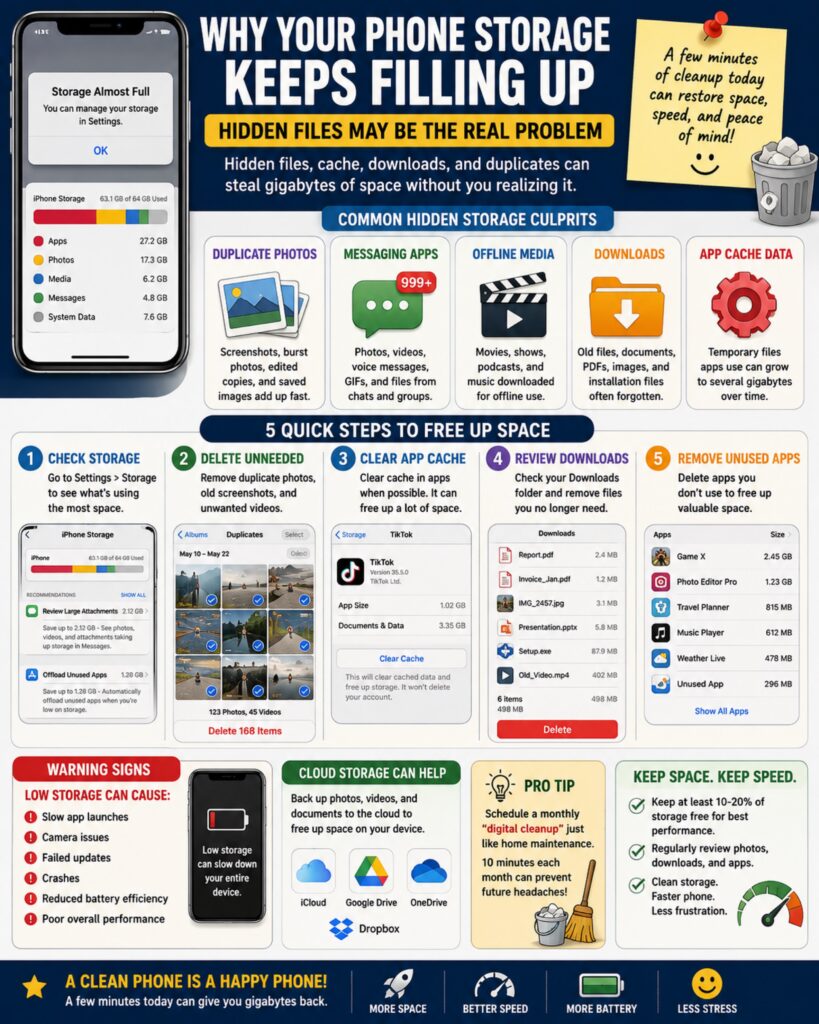
Many smartphone users are experiencing a common frustration: despite deleting photos, apps, and videos, their device continues to display “Storage Almost Full” warnings.
The issue is often caused by hidden storage consumers that accumulate quietly over time. These include cached files, duplicate photos, downloaded attachments, temporary app data, offline media, old backups, and forgotten downloads.
As phones become the primary tool for communication, entertainment, work, banking, photography, and navigation, storage management has become an increasingly important part of device maintenance.
📱 Why This Matters Now
Modern smartphones regularly handle:
* High-resolution photos
* 4K and 8K videos
* Social media content
* Streaming downloads
* AI applications
* Messaging attachments
* Cloud synchronization
* Automatic backups
Many users are surprised to learn that apps often store temporary data that continues growing long after the app has been installed.
Some applications may accumulate several gigabytes of cache data without obvious warning.
⚠️ Common Hidden Storage Culprits
📸 Duplicate Photos
Many people unknowingly save:
* Screenshots
* Burst photos
* Edited copies
* Downloaded images
* Shared images from messaging apps
Thousands of duplicate images can consume significant storage space.
💬 Messaging Apps
Text and messaging platforms often store:
* Photos
* Videos
* Voice messages
* GIFs
* Attachments
Group chats are particularly notorious for consuming storage.
🎥 Offline Media Downloads
Streaming services frequently download:
* Movies
* TV episodes
* Podcasts
* Music playlists
Many users forget these files remain on the device after viewing.
📂 Downloads Folder
Documents, PDFs, images, installation files, and miscellaneous downloads often remain untouched for months or years.
⚙️ App Cache Data
Apps use cache files to improve performance, but these files can grow substantially over time.
Common offenders include:
* Social media apps
* Browsers
* Video streaming platforms
* Shopping apps
* Mapping applications
🛠️ Quick Troubleshooting Steps
Step 1
Open:
Settings → Storage
Review which categories consume the most space.
Step 2
Delete:
* Duplicate photos
* Old screenshots
* Unneeded videos
Video files often provide the fastest storage recovery.
Step 3
Clear app cache where appropriate.
This may free hundreds of megabytes or even multiple gigabytes.
Step 4
Review downloads and remove unnecessary files.
Step 5
Remove unused applications.
Many people have dozens of apps they haven’t opened in months.
☁️ Cloud Storage Considerations
Cloud services can help reduce local storage usage by:
* Backing up photos
* Storing documents
* Syncing files across devices
However, cloud storage should supplement organization—not replace it.
Large amounts of unnecessary data can accumulate in the cloud as well.
🚨 Warning Signs Your Storage Is Affecting Performance
Low storage can contribute to:
* Slow app launches
* Camera problems
* Failed updates
* Crashes
* Reduced battery efficiency
* Poor overall performance
Most devices operate best when a portion of storage remains free.
💡 Pro Tip
Schedule a monthly “digital cleanup” just like routine home maintenance.
Spending 10 minutes each month reviewing photos, downloads, and apps can prevent future storage headaches and keep devices running smoothly.
🔍 Tech Takeaway
Your phone may not be running out of storage because you have too much data.
It may be running out of storage because hidden files have quietly accumulated over time.
A few minutes of cleanup today can restore performance, free space, and extend the useful life of your device.
📱⚡🧹💾 Clean storage. Faster phone. Less frustration.
Microlearning Is Changing How People Learn — Small Lessons Are Producing Big Results
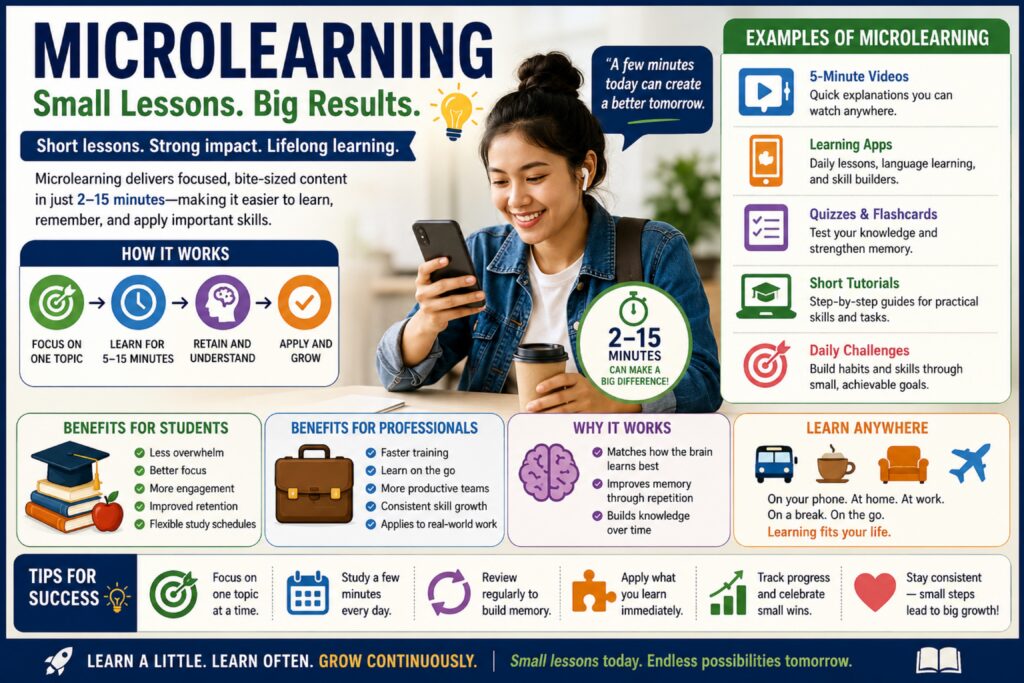
Educators, employers, training organizations, and learning platforms are increasingly adopting a strategy known as microlearning — the practice of learning information in short, focused sessions rather than long lectures or study periods.
Instead of spending hours trying to absorb large amounts of information at once, learners consume small lessons that typically take between 2 and 15 minutes to complete. These lessons often focus on a single skill, concept, or objective before moving to the next topic.
As attention spans compete with notifications, busy schedules, and information overload, many experts believe microlearning better matches how modern people consume and retain information.
📚 Why This Matters Now
The amount of information available today is growing at an unprecedented rate.
People are constantly learning:
* New technology
* Workplace skills
* Industry certifications
* Personal finance
* Health information
* AI tools
* Software updates
* Professional development
Traditional learning methods often require large time commitments that many people struggle to maintain.
Microlearning offers a practical alternative by making education more accessible and manageable.
🧠 How the Brain Benefits
Research suggests that smaller learning sessions may help improve:
* Information retention
* Focus and concentration
* Long-term memory formation
* Learning consistency
* Engagement and motivation
When information is broken into smaller segments, the brain often processes and stores it more effectively than during long periods of passive consumption.
This approach is sometimes paired with spaced repetition, where concepts are revisited over time to strengthen memory.
💻 Examples of Microlearning
Microlearning can include:
* A 5-minute instructional video
* A daily language lesson
* A short quiz
* A single tutorial
* Flash cards
* Interactive exercises
* Skill-building challenges
* Daily learning apps
Many successful learners now dedicate just a few minutes per day to continuous education rather than relying solely on lengthy study sessions.
🎯 Benefits for Students
Students may experience:
* Reduced overwhelm
* Better concentration
* Increased engagement
* Improved retention
* More flexible study schedules
Shorter learning sessions can be easier to fit around school, work, extracurricular activities, and family responsibilities.
👨💼 Benefits for Professionals
Organizations are increasingly using microlearning for:
* Employee training
* Safety programs
* Compliance education
* Leadership development
* Software onboarding
* Customer service improvement
Employees can learn critical skills without spending hours away from their primary responsibilities.
📱 Technology Is Driving the Trend
Smartphones, tablets, and online learning platforms have made education available almost anywhere.
People now learn while:
* Commuting
* Waiting in line
* Taking breaks
* Traveling
* Exercising
* Between meetings
Learning is becoming less about where you are and more about consistency.
🚀 Practical Learning Tips
If you’re trying to learn something new:
* Focus on one topic at a time.
* Study for 5–15 minutes daily.
* Review information regularly.
* Apply what you learn immediately.
* Track progress over time.
* Prioritize consistency over intensity.
Small daily efforts often outperform occasional marathon study sessions.
🌎 Community Impact
Accessible education helps strengthen communities by improving workforce skills, increasing digital literacy, encouraging lifelong learning, and creating more opportunities for personal and professional growth.
As educational tools become more widely available, microlearning may help bridge gaps for people who previously lacked time, resources, or access to traditional learning environments.
🔍 Learning Takeaway
You don’t have to study for hours to make meaningful progress.
A few focused minutes every day can compound into significant knowledge and skill over time.
📚 Learn a little. Learn often. Grow continuously. 🧠💡🚀
Community Tool Libraries Are Expanding — Borrow Instead of Buy
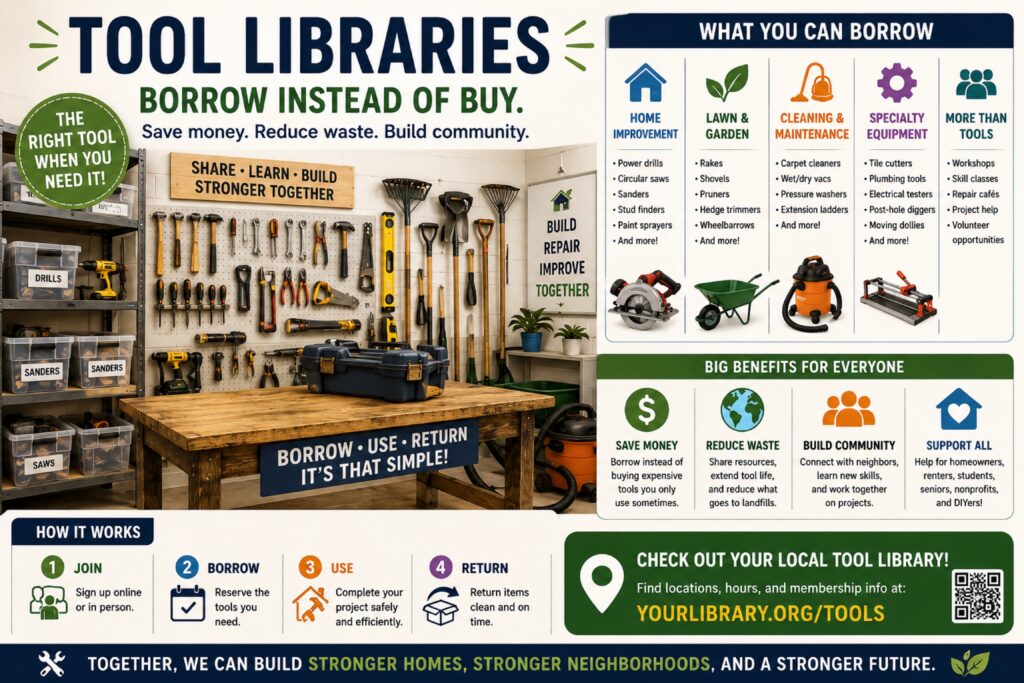
A growing number of communities are launching or expanding Tool Libraries, allowing residents to borrow tools, equipment, and home improvement supplies just like checking out books from a traditional library.
These programs are helping residents save money, complete projects, learn new skills, and reduce waste by sharing resources that are often only used a few times per year.
Many households own expensive tools that spend most of their lives sitting unused in garages, sheds, basements, or storage units. Tool libraries provide an alternative by making those same resources available to the community when needed.
🔨 Why This Matters Now
As the cost of living continues to rise, many families are looking for practical ways to reduce expenses.
At the same time:
* Home improvement projects remain popular.
* More people are repairing instead of replacing.
* Communities are embracing sustainability initiatives.
* Interest in DIY projects continues to grow.
Tool-sharing programs address all of these needs simultaneously.
🛠️ Items Commonly Available
Depending on the organization, tool libraries may offer:
Home Improvement
* Power drills
* Impact drivers
* Circular saws
* Jigsaws
* Sanders
* Stud finders
* Paint sprayers
Lawn & Garden
* Rakes
* Shovels
* Pruners
* Hedge trimmers
* Wheelbarrows
* Garden tillers
Cleaning & Maintenance
* Carpet cleaners
* Wet/dry vacuums
* Pressure washers
* Extension ladders
Specialty Equipment
* Tile cutters
* Plumbing tools
* Electrical testing equipment
* Moving dollies
* Post-hole diggers
Some locations even provide workshops, training sessions, and project guidance.
💰 Financial Benefits
Many tools cost:
* $50–$100 for occasional-use hand tools
* $200–$500 for power equipment
* $1,000+ for specialized tools
Borrowing instead of purchasing can save hundreds or even thousands of dollars annually.
For homeowners, renters, community groups, and nonprofits, these savings can be substantial.
🌎 Environmental Benefits
Tool-sharing programs also help:
* Reduce manufacturing demand
* Lower waste generation
* Extend equipment lifespan
* Reduce storage needs
* Promote responsible consumption
A single shared tool may replace dozens of individually owned tools.
👥 Community Benefits
Tool libraries often become more than equipment lending programs.
They frequently foster:
* Neighborhood collaboration
* Skill sharing
* Volunteer opportunities
* Community improvement projects
* DIY education
* Environmental stewardship
Many communities report stronger neighborhood connections when residents share resources and knowledge.
📚 Additional Resources Often Offered
Some organizations provide:
* Repair cafés
* Home maintenance classes
* Gardening workshops
* Safety training
* Volunteer mentor programs
* Community build days
These services help residents develop practical skills while strengthening community engagement.
🏘️ Who Benefits Most?
Tool libraries are particularly useful for:
* First-time homeowners
* Renters
* Seniors
* Students
* Community organizations
* Small nonprofits
* DIY enthusiasts
* Low-income households
They provide access to resources that might otherwise be financially out of reach.
🔍 Resource Takeaway
You may not need to own every tool you use.
Many communities now offer ways to borrow equipment, save money, reduce waste, and build stronger neighborhoods through resource sharing.
Remember:
Sometimes the smartest purchase is not purchasing at all. Borrow, build, save, and share. 🔨🏡🌎🤝
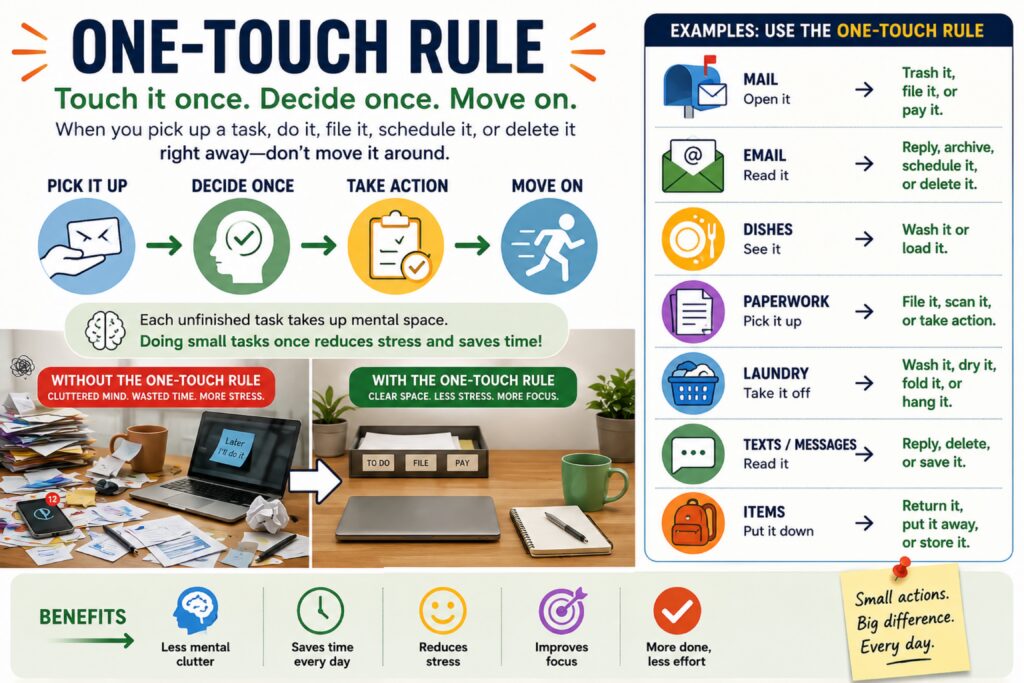
“One-Touch Rule” — Stop Moving the Same Task Around All Day
A simple productivity life hack gaining attention is the One-Touch Rule: when you pick up a small task, finish it, file it, schedule it, or delete it right away instead of moving it from place to place.
This applies to mail, emails, receipts, laundry, dishes, paperwork, text messages, and small chores. The goal is to prevent “task clutter” from piling up mentally and physically.
Why it matters now:
With constant notifications, work messages, online bills, subscriptions, and household responsibilities, people are overwhelmed by tiny unfinished tasks. Each unfinished item takes up mental space. Handling small tasks once reduces stress and saves time.
Examples:
Open mail → trash, file, or pay it.
Read an email → reply, archive, or schedule it.
See a dish → wash it or load it.
Take off a jacket → hang it instead of dropping it.
Life Hack Takeaway:
Touch it once. Decide once. Move on.